Simple firewalld watcher
Posted on Sun 05 April 2026 • 3 min read
While doing HackTheBox, CTF’s or similar stuff, I sometimes need a reverse shell to connect back to my computer.
This is almost always using a VPN, so I don’t have to think about NAT, firewall openings, etc
But more than once I’ve struggled to get a rev shell to connect back. Why? My computer has a local firewall 🤦
The solution is simple: sudo systemctl stop firewalld.service - but I actually want firewalld running most of the time, so this is not a good long-term solution.
Instead wouldn’t it be nice to get a notification whenever firewalld blocked something, to quickly diagnose the problem?
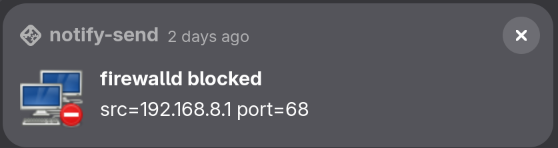
We can do that by first configuring firewalld to log all blocked connections:
firewall-cmd --set-log-denied=all   # or: unicast, broadcast, multicast
firewall-cmd --runtime-to-permanent
By watching journalctl1 for REJECT log entries, we can use notify-send to spawn a GUI alert!
journalctl --follow --dmesg --grep="filter_.*REJECT" -o cat | while read -r line; do
    declare -A kv
    for pair in $line; do
        key=${pair%%=*}
        val=${pair#*=}
        kv["$key"]="$val"
    done
    notify-send -i network-error "firewalld blocked" "[${kv[PROTO]}]: ${kv[SRC]}:${kv[SPT]} -> ${kv[DST]}:${kv[DPT]}"
done
The above is a long-running process which will “hang” your terminal. If you background it, it will still be a child process, so it stops when your terminal dies.
We can solve this by disown‘ing the process, but now we also need to make sure we don’t end up spawning multiple processes that monitors the same thing. One ugly hack is simply to pgrep the somewhat unique string, if it works, it works.
The full script to put in your ~/.*rc:
firewall-watcher() {
    # https://docs.redhat.com/en/documentation/red_hat_enterprise_linux/7/html/security_guide/configuring_logging_for_denied_packets
    if [[ $(firewall-cmd --get-log-denied) != "all" ]]; then
        echo "firewalld log-denied is not set to 'all'." >&2
        echo "Please run: firewall-cmd --set-log-denied=all" >&2
    fi
    pgrep -f 'journalctl .*filter_.*REJECT' > /dev/null && return 0
    journalctl --follow --dmesg --grep="filter_.*REJECT" -o cat | while read -r line; do
        declare -A kv
        for pair in $line; do
            key=${pair%%=*}
            val=${pair#*=}
            kv["$key"]="$val"
        done
        notify-send -i network-error "firewalld blocked" "[${kv[PROTO]}]: ${kv[SRC]}:${kv[SPT]} -> ${kv[DST]}:${kv[DPT]}"
    done &
    disown
}
-
Fun-fact: users aren’t allowed to read
dmesgdirectly (why is that??), butjournalctl --dmesgexposes it, which is nice ↩